3-2: Arithmetic Operators (continued)
Exercise 3-1 is our first simple illustration of the use of an arithmetic operator and the assignment of values resulting from the expressions.
Exercise 3-1: Calculating the Area of a Circle
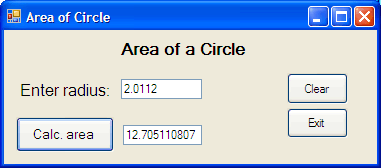
The idea is straight forward ... the user enters a value for the circle radius in the textbox and the area is displayed in the second textbox when the user presses the button. In addition one button clears the values so the user can easily enter new ones, and another button exits the program.
However, this is not quite as simple as it seems!
Start a new Visual Basic project and place the control objects on it as shown in the figure. Also set the Text properties of the various controls as shown. Note that the Text property of the form itself has also been changed. This can be seen in the title bar of the form window which instead of Form1 says Area of Circle.
The Exercise section in Chapter 2 discussed how it's better to name the control objects rather than to rely on default names such as Button1 or Textbox2 etc. So in this exercise, and in all exercises from now on, you must choose appropriate names by changing the (Name) property for each object, including the Form itself.
The (Name) property is found in the Design section of the Properties window (if the properties are categorised) or at the top of the list of properties if the list is alphabetic. Remember that the naming convention is to use a three letter prefix to identify a control object joined with a descriptive name of your choice. Thus we suggest:
frmCircleArea
lblRadius
txtRadius
btnArea
txtArea
btnClear
btnExit
Make these changes to the form design now.