3-4: Data Types in Visual Basic (continued)
The Moral of the story - always convert!
Clearly it is dangerous to rely on Visual Basic to convert between data types. Although it will often succeed, there are many situations where it will not. The result is that you must always be aware of the data types you are using and ensure that values have the appropriate types for the calculations you wish to perform.
Fortunately there are ways of converting between data types which we will look at now.
Most often you will want to convert a string value (obtained from the Text property of a control) to an integer or a real number. This
is in fact what we need to do for Exercise 3-2. Visual Basic has a number
of built-in functions  that perform conversions,
a few of which are listed in Table 3-3. These functions convert the argument
type into the result type, if it is possible. If it is not possible an exception
will occur.
that perform conversions,
a few of which are listed in Table 3-3. These functions convert the argument
type into the result type, if it is possible. If it is not possible an exception
will occur.
This word we have just used - function - represents a major topic all by
itself. We'll be using functions frequently, but will not describe them more
formally until Chapter 6.
Table 3-3: A partial list of data conversion functions.
| Function Name | Return Type | Argument |
|---|---|---|
| CBool | boolean | any valid String or numeric expression |
| CCur | currency | a string or numeric expression within the range of currency values |
| CDbl | double real number | a string or numeric expression within the range of double real values |
| CInt | integer | a string or numeric expression within the range of integer values, fractions are rounded |
| CLng | long integer | a string or numeric expression within the range of long integer values, fractions are rounded |
| CSng | single real number | a string or numeric expression within the range of single real values |
| CStr | string | any valid value or expression |
| CDate | date | any value that can be interpreted as a date |
You will also use the CStr function a lot when you assign a value to the Text property of a Textbox, for example.
System.Convert Class
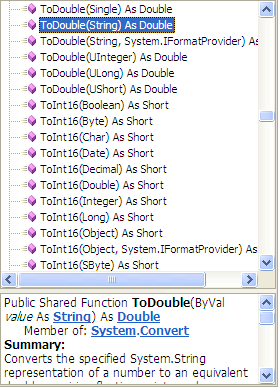
Note that there is also a class called System.Convert with many methods, such as ToDouble, that can be used to perform conversions between data types. Open the Object Browser and select the System grouping, then select Convert. You'll see methods such as those shown in Figure 3-8 (after scrolling down).
There are many methods named ToDouble, with different argument types, all of which produce a Double value as the result. Thus one can convert a Boolean to a Double, a Byte to a Double, an Integer to a Double, and so on. 0f course we're mostly interested in the String to Double conversion.
The functions in Table 3-3 are the approach that was used in earlier versions of Visual Basic and they are still provided in VB 2005 for compatibility reasons. The methods of the System.Convert class are the conventional object oriented approach. The numerous methods of the same name but with different argument types are said to be "overloaded".
In subsequent exercises we will use either approach. As we revise Exercise 3-2 we will give examples of using both the functions of Table 3-3 and the methods of the System.Convert class.