4-6: More on Nested If Statements
Introduction
We have seen a few examples of creating boolean expressions and their use in If statements. One very common use is in validating user input. In fact most programs will use If statements in this way. The logic of programs also often requires the use of If statements, and we'll explore that more in this section.
Often the intent of the specification of a program is clear, but the implementation of the logic of the program may be more difficult. No doubt you will benefit from further examples of this nature.
Exercise 4-4: Improving the Guessing Game
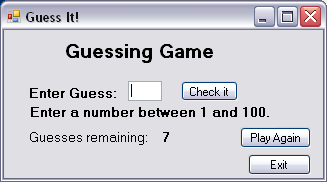
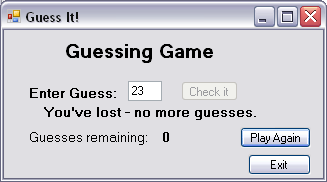
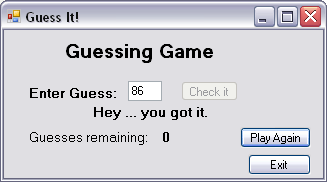
The guessing game that we implemented in Exercise 4-2 permits an unlimited number of guesses. This is perhaps not much of a challenge, so how could we limit the guesses and also show the user how many guesses they have left as the game proceeds? We should also tell the user that they won if they guessed the number within the allowed number of guesses, or tell them they lost if they could not.
This change will require a new integer variable that is initialised to some maximum value and decreased (decremented) every time the Check It button is pressed. The value of this new variable will have to be checked and once it becomes 0, if the user has not guessed the correct number a message saying they lost will appear. If they happened to guess correctly on their last guess, or before their last guess, a message saying they won should appear.
In either case, i.e. a loss or a win, the interface should force the user to click on the Play again button or the Exit button if the player has run out of guesses. And the Check it button and the Guess textbox should be disabled when the player has run out of guesses. Of course these interface objects should become active again if the user presses the Play again button.
The figures show the modified interface, having the addition of two label objects one of which displays the number of guesses remaining. Notice that the Check It button is disabled in the second and third figures, forcing the user to click either the Play Again or the Exit button to proceed.
Notice also that in the third figure the user has guessed the correct number on their last guess, and that the message indicates they won.