4-7: Exercises
Exercise 4-8
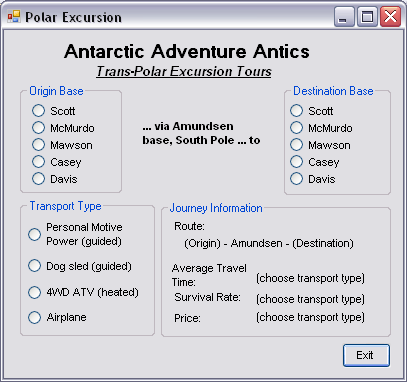
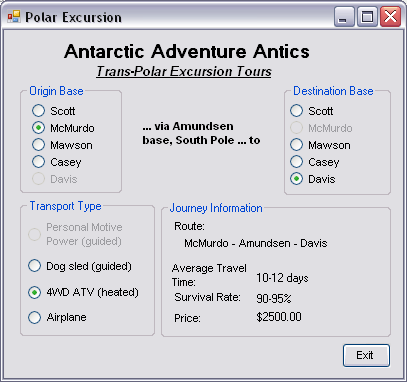
This exercise reinforces and further explores the use of groups of radio buttons while also requiring use of variables and If statements. The response of the interface to different possible sequences of user actions is also an important element of the exercise. The concept is quite simple - a program to select and provide basic information about adventure travel options offered by a company in Antarctica.
Develop the user interface shown in the sequence of images of Figure 4-15. The first image shows the interface immediately upon starting the program. Travel options offered all go to the south pole (the Amundsen base) starting at some other base and ending at a third base. Transport options are also indicated.
The origin and destination bases may not be the same, however. I.e. a traveller may not start at one base, travel to the south pole and then return to the same base they started from. Therefore once an origin is selected that same base is disabled as a destination (i.e. it cannot be selected) and once a destination is selected that base is disabled as an origin. This is shown in the second image.
Hint: you should be able to use the Boolean values of the Checked property rather than an If statement.
Additionally, if the Davis base is selected as either an origin or a destination, the Personal Motive Power travel option (i.e. on foot!) is disabled because the journey from Davis to Amundsen on foot is just too arduous. This is also shown in the second image.
The label showing the selected route (in the Journey Information groupbox) should be changed immediately when an origin or destination base is selected.
The travel time, survival rate and price depend only on the type of transport - and NOT on the origin and destination. You can make up the actual values. You should declare them as constants. There will be eight. Simply make them all String constants to avoid the complication of formatting.
You should design the program so that if the user makes a particular selection, and then changes it, the display is correctly updated. For example, suppose the user selects Scott and Casey as the bases, and Personal Motive Power as the transport type. Certain information will be displayed in the travel time, survival rate and price boxes. If the user now changes from Casey to Davis the travel option is no longer valid and should be deselected and disabled and the travel time, survival rate and price data should be cleared.