3-3: Events and Sequential Processing (continued)
Programming the Command Buttons (continued)
 Observe the order in which
these statements are written. We could not calculate the compounded capital at
the end of year 1 without first having calculated the interest amount; we could
not calculate the interest for year 2 without first having calculated the
capital at the end of year 1, etc.
Observe the order in which
these statements are written. We could not calculate the compounded capital at
the end of year 1 without first having calculated the interest amount; we could
not calculate the interest for year 2 without first having calculated the
capital at the end of year 1, etc.
Thus, an important point of this exercise is that the program statements must be written in the specified order because they are executed sequentially. In any set of statements the order is crucial, because of the fact that those statements are executed in sequence by the computer.
Exercise
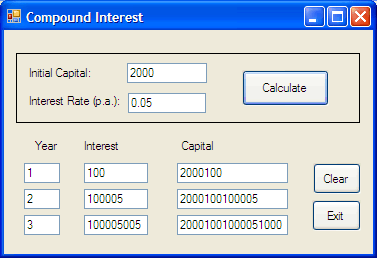
Enter these statements into the Calculate_Click event code and run the program. If you enter 2000 as the amount of initial capital and 0.05 (i.e. 5%) as the interest rate you should see the calculated values for years 1 to 3 as shown in Figure 3-7.
With the exception of the interest amount for year 1 these values are clearly incorrect. Observe that the capital value for year 1, which should be 2100 is instead 2000100, which is the joining together of the values 2000 and 100 rather than the addition of them!
The calculation of year 2 interest is correct - if 2000100 is the amount on which the interest is based - but the year 2 capital is again the joining together of 2000100 and 100005.
It seems that the multiplication of two values is correct, but that the addition is not. So what is the problem?
The names for these quantities should give you a clue. In fact they are not numbers, but text - or string - data, and therefore we should not be trying to perform arithmetic with them! Any value obtained from or displayed in a textbox, via the Text property, is in fact string data.
We'll explore this more fully in the next section!