4-4: Validating Input Data
In testing the program you probably observed that if you entered a value for the guess that could not be converted to an integer the program crashed with a InvalidCastException was unhandled error message. Preventing programs from crashing because of unexpected user input is sometimes a difficult task, so we'll return to it quite frequently.
Anything the user types into a textbox can be assigned to the Text property since it is treated as string data. The problems arise when you try to do something with the value. Normally that involves converting it to some other data type such as an integer, double, currency, or a date, etc. If the value cannot be converted the program will crash.
So why not check that it can be converted before actually converting it? Fortunately Visual Basic gives us the tools to do precisely that!
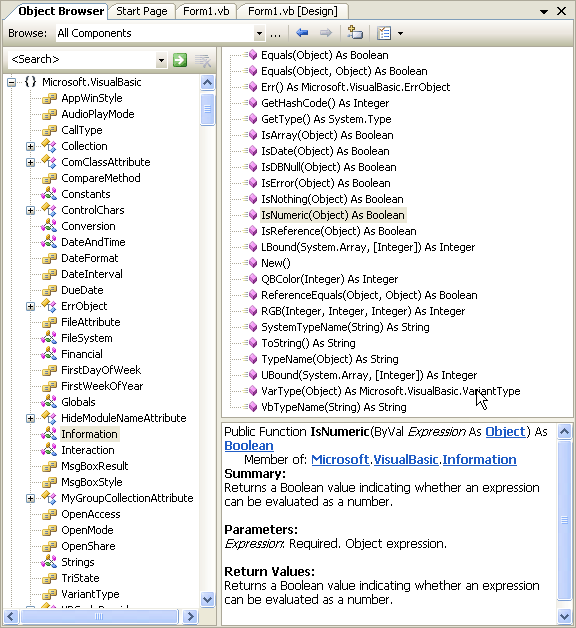
The IsNumeric function, for example, returns the boolean value True if the supplied argument can be converted to a number, and False if it can't. You'll find a short description of this function in the Object Browser, as shown in Figure 4-6. Notice the namespace where you can find it, namely the Microsoft.VisualBasic.Information module.
So in this current example we should check if the value in the textbox "is numeric", and if it is not we should display a message telling the user to enter a number. If it is numeric we can proceed with the calculation as already described. This validation of the input should take place in the click event of the Check It button, which is where we attempt to use the value input by the user.
Thus an if statement which says
if (text entered by user is numeric) then
assign the (converted) value to the Guess variable
use the if
statement described above to display the appropriate
message
else
display
message telling user to enter a number
end if
captures this intention. All you have to do is write this in actual code!


We could go further in validating the input even in this simple program. For example, at the moment the user could enter any number at all, but we could force them to enter a number between 1 and 100 if we wanted to. You could try this yourself of course, but we'll move on from this exercise now.
 This is not the correct way to
validate input in Visual Basic. We do this here simply as further practice using
If statements. The correct way is to use the _Validating event of a textbox control; but we will not use
this just yet, prefering to focus only on If
statements. The _Validating event is introduced in
Exercise 4-9 at the end of this chapter. Shortly we will even use the _LostFocus event as a means of validating input - and while
useful in the sense that it exposes you to another event and to the further use
of If statements, this is not the correct approach
either!
This is not the correct way to
validate input in Visual Basic. We do this here simply as further practice using
If statements. The correct way is to use the _Validating event of a textbox control; but we will not use
this just yet, prefering to focus only on If
statements. The _Validating event is introduced in
Exercise 4-9 at the end of this chapter. Shortly we will even use the _LostFocus event as a means of validating input - and while
useful in the sense that it exposes you to another event and to the further use
of If statements, this is not the correct approach
either!