4-7: Check Box and Option Controls
Exercise 4-6: Global Classics Cinema
This exercise develops a movie ticket sales program. At this first stage in its development it does nothing more than allow the sales clerk to select a movie, show time, and the number of tickets of various sorts, displaying a total. The interface is shown in the figure.
interface
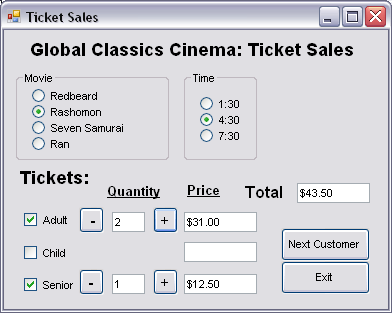
In this interface the movie names are built into the window display, which is silly when it comes to changing those movies. Ultimately the program should be more flexible, perhaps interacting with a file or database in which information pertaining to the movies is stored and continually updated. The Text properties of the option buttons could then be assigned values from the database programmatically rather than being specified at design time. It should also be able to print tickets, for example.
For the time being, although the program is longer than previous examples, its functionality is deliberately limited so that only the new object types and the approach to dealing with groups of objects is introduced. Of course, the continued use of variables and If statements is also important. In addition this exercise illustrates how we might design an interface that carefully controls (limits) what the user can do, leading them to interact with the program in the way we want.