4-3: If Statements
Exercise 4-2: Number Guessing Game (continued ...)
Thus we need to write
Dim randomNum as Randomor
Private randomNum as Random
which simply declares that the name randomNum will refer to an object of the Random class, and then
randomNum = New Randomwhich actually creates the new object of the Random class. Note the use of the New keyword.
Having created the object of the Random class, i.e. randomNum we can now call methods of the class on that object by writing
numToGuess = randomNum.Next(1,101)for example.
How do we know we can use the method on the object in this way? I.e. why is it used on the right hand side of an assignment statement and why are there two values in the parameter list?
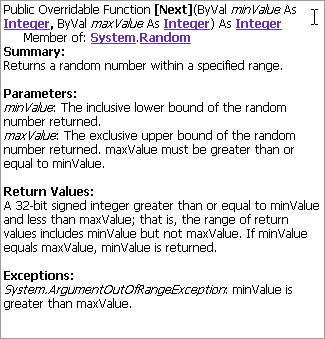
The answer is that the Object Browser tells us how to use the methods. In this case the Object Browser describes the method as shown in Figure 4-5.
Notice first the parameters. They are described as minValue: the inclusive lower bound of the random number returned. We write 1 for this because we want random numbers greater than or equal to that value. And the other parameter is maxValue: the exclusive upper bound of the random number returned. We wrote 101 for this because we want random numbers that are less than or equal to 100. I.e. we provided "input" values for the method that were suitable for the problem we are trying to solve.
Notice next that the Object Browser tells us that this is a Function as stated in the first line. (Ignore Public Overridable for now.) And that after the closing parenthesis of the parameter list it specifies As Integer. Further down the section Return Values: describes the value produced by the function as A 32-bit signed integer greater than or equal to minValue and less than maxValue.
Thus this particular method is a function method. You have seen functions before and know that they take "input values" (parameters) and produce an answer value which you must use in some way. Often the answer value is assigned to a new variable or used in an expression. The only difference is that a function method must be called on an object ... which is why we wrote
numToGuess = randomNum.Next(1,101)