4-8: Review Questions
| Note: These questions are from Tests and Exams when the course was based on VB6, an earlier version of VB. Most are still relevant to VB2005, and are still good preparation for tests and exams. | |||||||||
| Multiple Choice (role the mouse pointer over your answer) | |||||||||
|---|---|---|---|---|---|---|---|---|---|
| 4-15 | If optChoice is the name
for a control array of option buttons which of the following will set the
Value property of the third option button in the
control array to True
| ||||||||
| 4-16 | The Validate event of a
control object such as a textbox is executed
| ||||||||
| 4-17 | If optChoice is the name
for a control array of option buttons you might see in program code
something like optChoice(2).Value. The optChoice(2) part of such an expression is a
| ||||||||
| 4-18 | The Validate event of a
control object such as a textbox has the template: Private Sub txtTextBox_Validate(Cancel As Boolean) End Sub The code you write for the event must
| ||||||||
| Questions involving understanding code | |||||||||
| 4-19 | 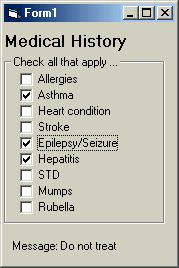
This image shows a form with a control array of check boxes called chkCondition. The form also contains (at the bottom) a label object for which the Caption property is assigned the value Do not treat or OK to treat depending on which textboxes are checked. Given this code for the chkCondition_Click event: Private Sub chkCondition_Click(Index As
Integer) what message will be displayed if the user checks the checkboxes Allergies, Heart condition, and Mumps in the order given. | ||||||||
| 4-20 |
Using the same image as shown in Q.4-19 and given this following code for the chkCondition_Click event: Private Sub chkCondition_Click(Index As
Integer) what message will be displayed if the user checks the checkboxes Allergies, Heart condition, and Mumps in the order given. | ||||||||
| 4-21 |
The _Click event of a command button has the following code: Private Sub cmdTest_Click() |
||||||||
|
The next four questions refer to this _Click event: Private Sub cmdGetAnswer_Click() | |||||||||
| 4-22 | 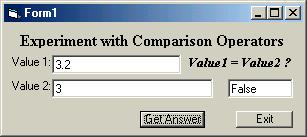
This image shows the interface from Ex. 4-1, where the code is shown above. In the code the value from the textbox Value1 is stored in a variable, varOne, declared As Double and the value from textbox Value2 is stored in a variable, varTwo, declared As Integer. The result shown, i.e. False, implies that in the comparison the Integer value is converted to a Double value. |
True | False | ||||||
| 4-23 | 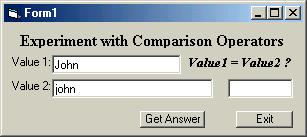
This image shows the interface from Ex. 4-1, where the code is shown above. In the code the value from the textbox Value1 is stored in a variable, varOne, declared As String and the value from textbox Value2 is stored in a variable, varTwo, declared As String. The result when the Get Answer button is pressed will be .... |
True | False | ||||||
| 4-24 | 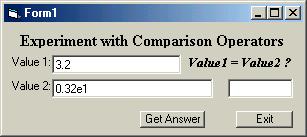
This image shows the interface from Ex. 4-1, where the code is shown above. In the code the value from the textbox Value1 is stored in a variable, varOne, declared As Double and the value from textbox Value2 is stored in a variable, varTwo, declared As String. The result when the Get Answer button is pressed will be .... |
True | False | ||||||
| 4-25 | 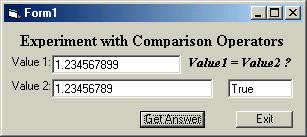
This image shows the interface from Ex. 4-1, where the code is shown above. In the code the value from the textbox Value1 is stored in a variable, varOne, declared As Double and the value from textbox Value2 is stored in a variable, varTwo, declared As Single. The result shown, i.e. True, implies that in the comparison the Single value is converted to a Double value. |
True | False | ||||||
| Questions involving writing code | |||||||||
| 4-26 | 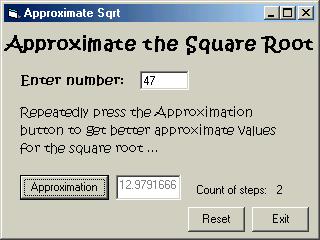
This form image shows an application that will calculate an approximation to the square root of a number that is entered in the appropriate textbox. The user presses the Approximation command button repeatedly to obtain successively better approximate values for the square root. Notice that a label control object is used to indicate how many times the Approximation command button has been pressed. In this question you are asked to write the _Validate event for the txtNumber textbox, so you don't really need to know how the calculation is performed. You do need to use appropriate variables, and therefore the code for the _Click event of the Approximation command button is given here, along with the global (form level) variable declarations: ' The _Validate event must check that the entered number is greater than zero. If it is not the _Validate event should cause a message box to be displayed and the textbox to be cleared. If the entered value is valid the event must initialise the first value for the approximation to the square root. It is adequate that the first approximation is the number itself. | ||||||||
| 4-27 | 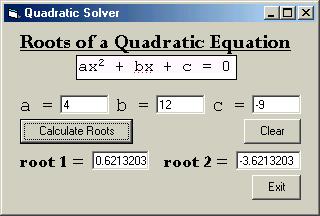
This form image shows an application that will calculate the roots of a quadratic equation using the quadratic formula. The coefficients are entered in the appropriate textboxes named txtA, txtB, and txtC. If they can be calculated the roots are shown in textboxes named txtRoot1 and txtRoot2. There is also a label control object namd lblMessage, invisible in the image, that is made visible to inform the user if the roots cannot be calculated. The label object has the caption Roots cannot be calculated. Implement the cmdCalculate_Click() click event. It should first make the label object invisible and clear the two textboxes that are to contain the two roots of the quadratic. Then provided the coefficient from txtA is not zero, and provided b*b - 4*a*c is not less than zero the roots are calculated and displayed. Otherwise the label object is made visible. Assume the coefficients entered by the user are valid numeric values. As a subsequent step you could implement Validate events for the textboxes. | ||||||||
| 4-28 | 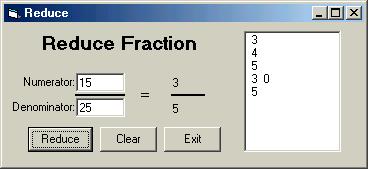
This form image shows an application that will reduce a fraction. (It is actually Exercise 5-7 in the next chapter!) The numerator and denominator are entered in textboxes and clicking the Reduce command button will cause the calculation to occur. The denominator entered in the textbox should not be zero of course. Write the _Validate event for the txtDenominator textbox. It would be best if you can write the event so that any non-integer entered is treated as invalid as well as the value zero. | ||||||||
Correct
Wrong
(... to be continued ...)