4-2: Boolean Expressions
Exercise 4-1: Experimenting with Boolean Expressions
Lets play around a bit with the comparison operators and boolean expressions. Experimentation should help you to understand their use.
Operators
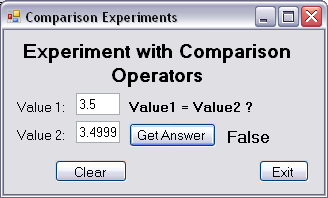
We'll create a program with the interface shown here. You'll be able to enter values and compare them. By changing the program code you'll be able to use operators other than the "equal to" operator. Also by changing the program code you'll be able to explore the comparison of values with different data types.
Open a new project and create the interface. The Clear button should assign vbNullString to the textboxes, and "???" to the label displaying the answer. It should also set focus to the value1 textbox ready for further data entry.
Choose appropriate names for the textboxes containing the two values, the command buttons, and the label object displaying the result.
Program the click event for the Exit button in the normal way. The Get Answer button event contains the important code, of course. This event should declare three local variables, two of which will hold the values obtained from the Text properties of the Value1 and Value2 textboxes, and the third will hold the result of the comparison of these two values. This third variable must therefore be declared as Boolean since its value will only ever be True or False.