4-5: Boolean Operators
Exercise 4-3: Is a year a leap year?
As an exercise in using these operators we'll write a program that determines whether or not a year is a leap year. A leap year is one which is either divisible by 4 but not by 100, or which is divisible by 400. Thus 2004 is a leap year (it is divisible by 4 but not by 100); 2100 is not a leap year (divisible by 4 but not by 100 is false and divisible by 400 is false); 2400 is a leap year (divisible by 4 but not by 100 is false, but divisible by 400 is true).
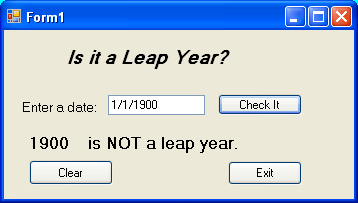
The user interface is shown in the figure. When the program is first started or after the Clear button is pressed the textbox is empty and the message (currently reading "1900 is NOT a leap year" in the figure) is not visible. You have used a similar approach previously. The message consists of two Label objects - one for the year and the other for the short piece of text. The Text properties of these Labels are set to the null string at design time, and then assigned new values as the program executes (at run time).
Design the interface, making sure to name the interface objects such as txtDate, btnCheckIt, lblYear, lblMessage, btnClear, and btnExit.
Next program the click event code for the Exit and Clear buttons. The Exit button is straight forward. The Clear button should simply set the Text property of the txtDate textbox to the null string, set the Text properties of the lblYear and lblMessage labels to the null string, and also set the focus to the txtDate textbox thereby allowing the user to type another date in the textbox without first having to click there.

