3-5: Variable Declarations
Exercise 3-3: Compound Interest Calculator Version 2
The program we have been developing for Exercise 3-2 is rather limited in that it can only calculate the compound interest for three years. It would be much better if we could perform the calculation for any number of years. Of course, you know that there is a formula that expresses the accumulated (compound) capital after a specified number of interest payment periods. However, we will persist with our approach here as a means of illustrating the programming techniques.
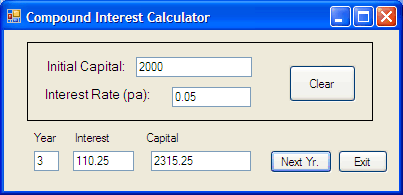
Our next idea is to produce a program with the interface shown in Figure 3-11. The intention is that by clicking the NextYr button the year is incremented and the interest and capital amounts are calculated. When the program first begins no values are displayed. The user enters values for the initial capital and the interest rate and then the first click on the NextYr button calculates the values for year 1. The figure shows the program after 3 clicks on the button.
There are a few complications with this interface that you should keep in the back of your mind. In particular, what should happen if the user, having clicked a few times on the NextYr button, decides to enter a new value for the interest rate (or the initial capital)? We will need to program a suitable response to such an event.