4-3: If Statements
Exercise 4-2: Number Guessing Game
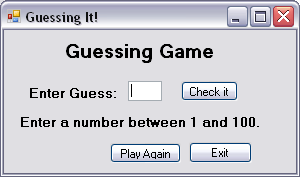
In this exercise you'll design a simple game in which the player tries to guess a number that has been selected randomly between 1 and 100. The interface is shown in the figure.
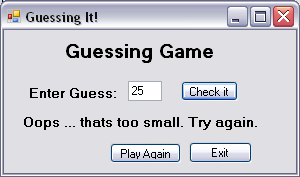
When the user enters a guess and presses the Check It button a message is displayed giving feedback about the guess. Feedback consists of a message such as too small, too large, or equal to the number. This is shown in the second figure. The user can then enter a new guess in the Guess textbox and press the Check It button again.
When the user presses the Play Again button (presumably after they have successfully guessed the current number) a new random number is generated, the Guess textbox is cleared and the feedback message is reset to the string shown in the first figure.
The feedback message is a label object, which has its Text property set to the appropriate message string depending on the guess entered by the user. Thus the program involves making a decision about what to assign to the Text property based on comparing the guess and the random value.